iFANN
    Search iFANN...
    Log in
    Home
    News
    Videos
    Photos
    GIFs
    Explore
    Polls
    Awards
    iFAMOUS
    Wiki
    Anime
    Rooms
    Notifications
    Messages
    Bookmarks
    Profile
    WikiAwardsiFAMOUSRankingsIndustriesCreator RewardsUser RewardsTermsPrivacyCommunity GuidelinesTakedown / DMCAHelpDevelopers

    © 2026 iFANN

    Home
    Search
    Messages
    Alerts
    Profile
    Photo
    Ts Floyd
    Ts Floyd@ts_floyd1h
    📱GitHub💭AI💭Tech
    opus-5.5 reverse-engineering tool

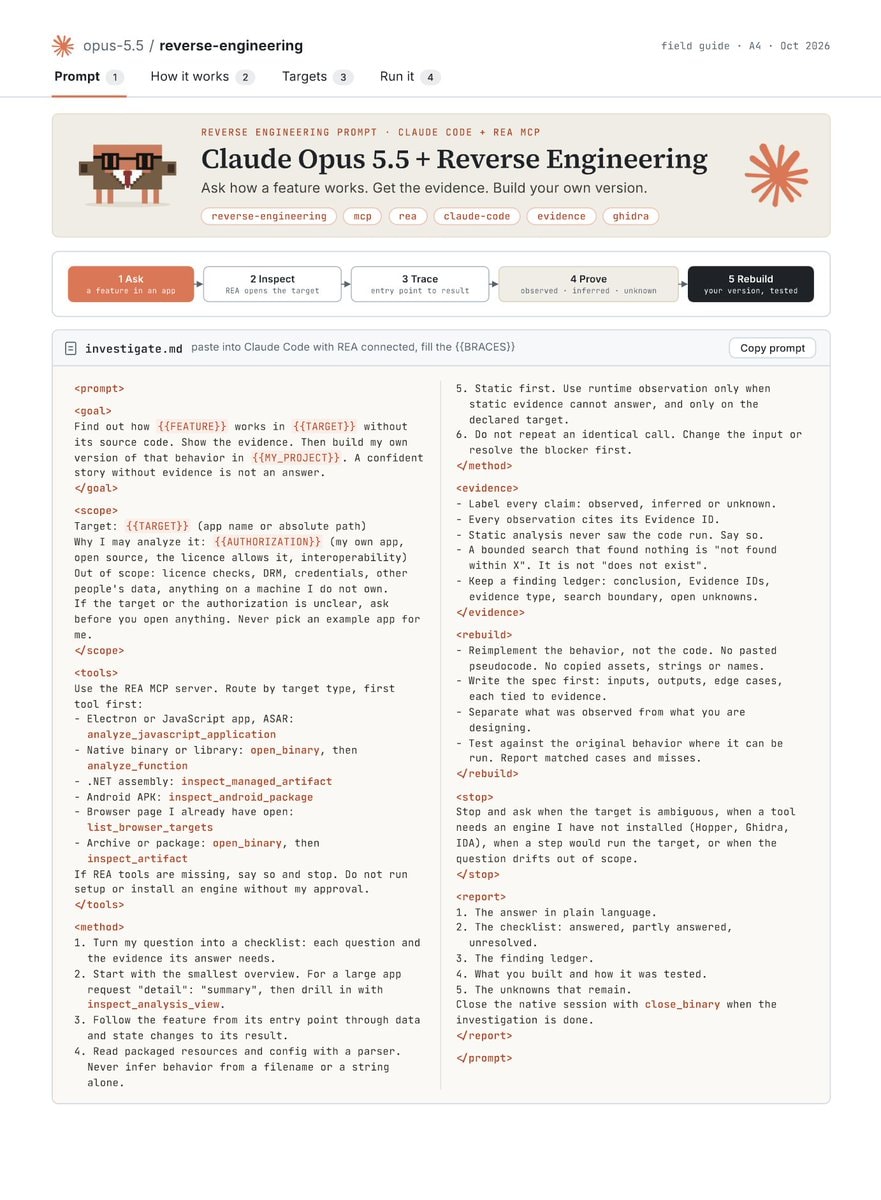
    @ts_floydA new workflow combining Claude Opus 5.5 with Reverse Engineering MCP has reportedly impacted over 100 software companies by enabling an agent to analyze applications without ever touching their source code. The method follows a strict sequence: ask questions like how does search work in the Notes app, inspect binaries or sites locally, trace features from entry to result, prove claims via observation tags, and rebuild the application. One specific instance involved a function rebuilt in C that passed 3,205 test cases while matching all 63 compiled bytes of the original. Getting started requires a single line command, npx rea-agents setup, followed by sending the GitHub repository and the Claude Opus 5.5 setup directly to the agent. Users can then reference an article containing best practices for the Opus 5.5 prompt to refine their approach. #GitHub

    View original post

    opus-5.5 reverse-engineering tool

    Photo by @ts_floyd· Oct 12, 2026· GitHub

    About this photo

    The image is a screenshot of a web page detailing a reverse engineering prompt. The focus is on the text and layout of the prompt itself, presented in a clean, technical, and instructional style. The mood is informative and methodical. A notable visual element is the pixelated robot icon on the left and the stylized asterisk logo on the right. The page title reads "opus-5.5 / reverse-engineering".

    See all GitHub photosRead the GitHub wiki

    ?

    More GitHub photos

    See all GitHub photos
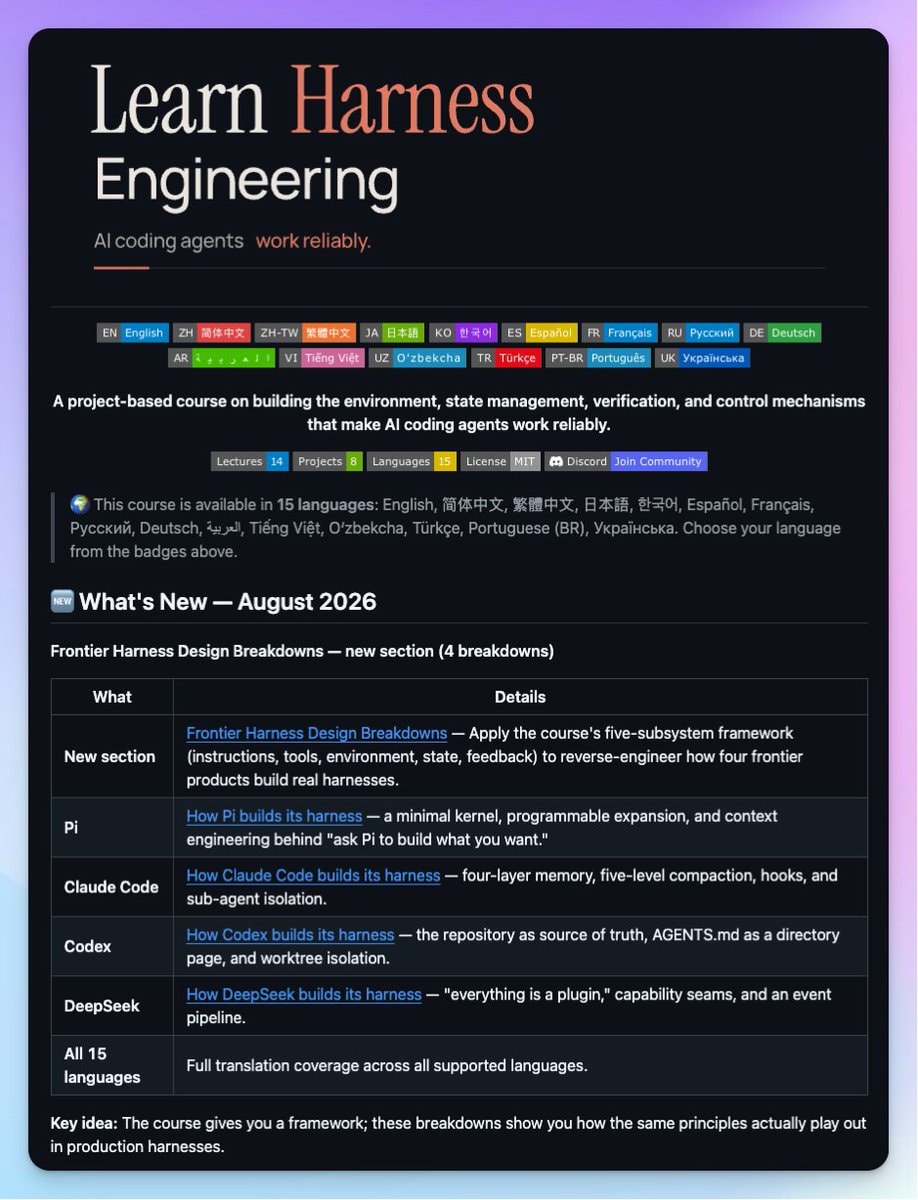
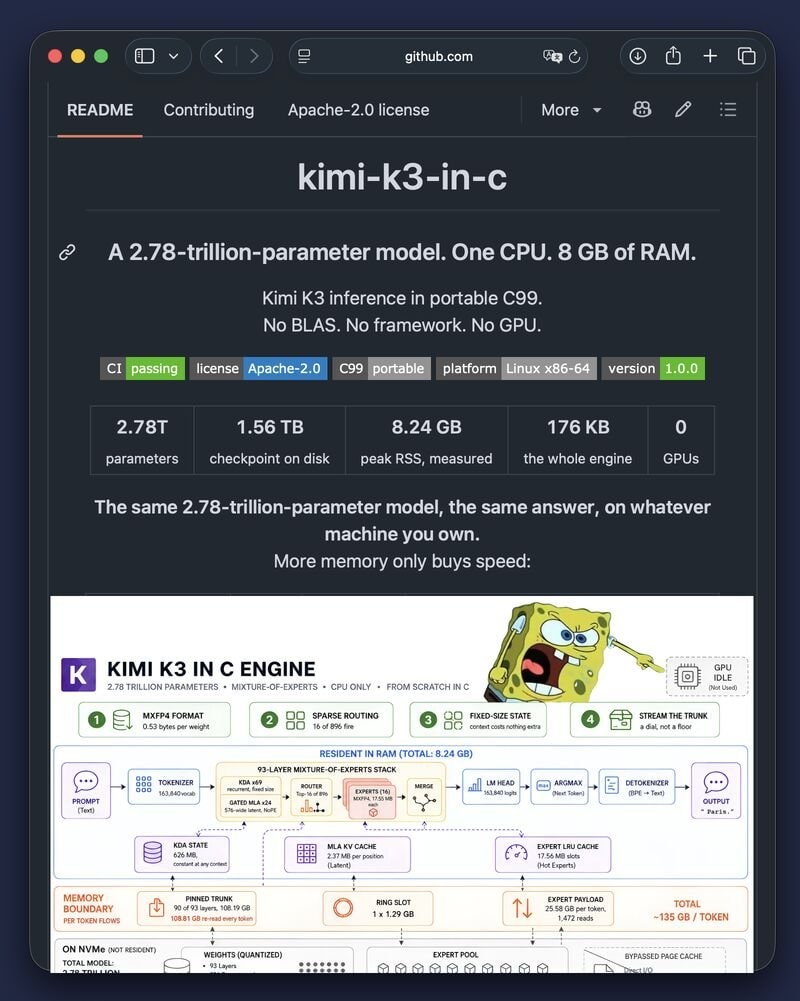
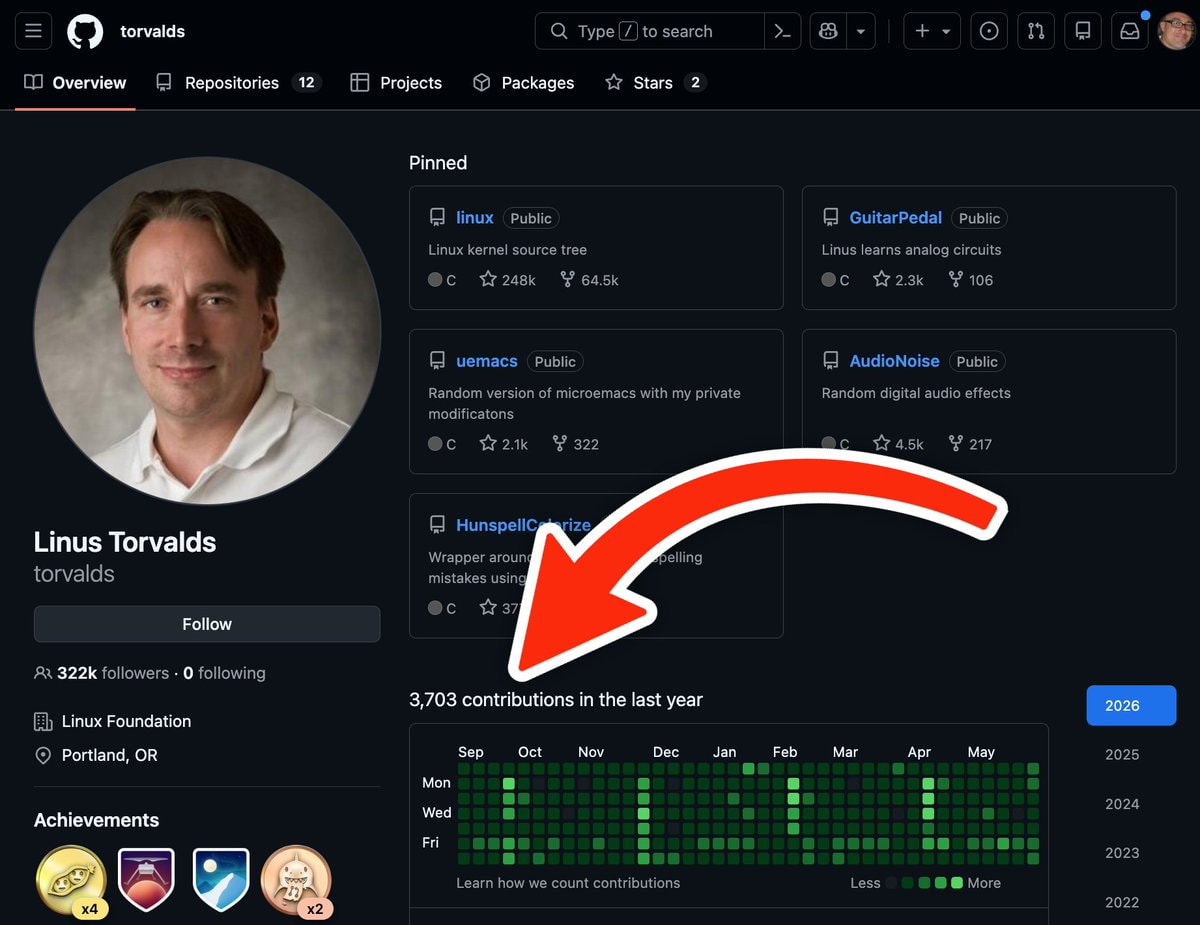
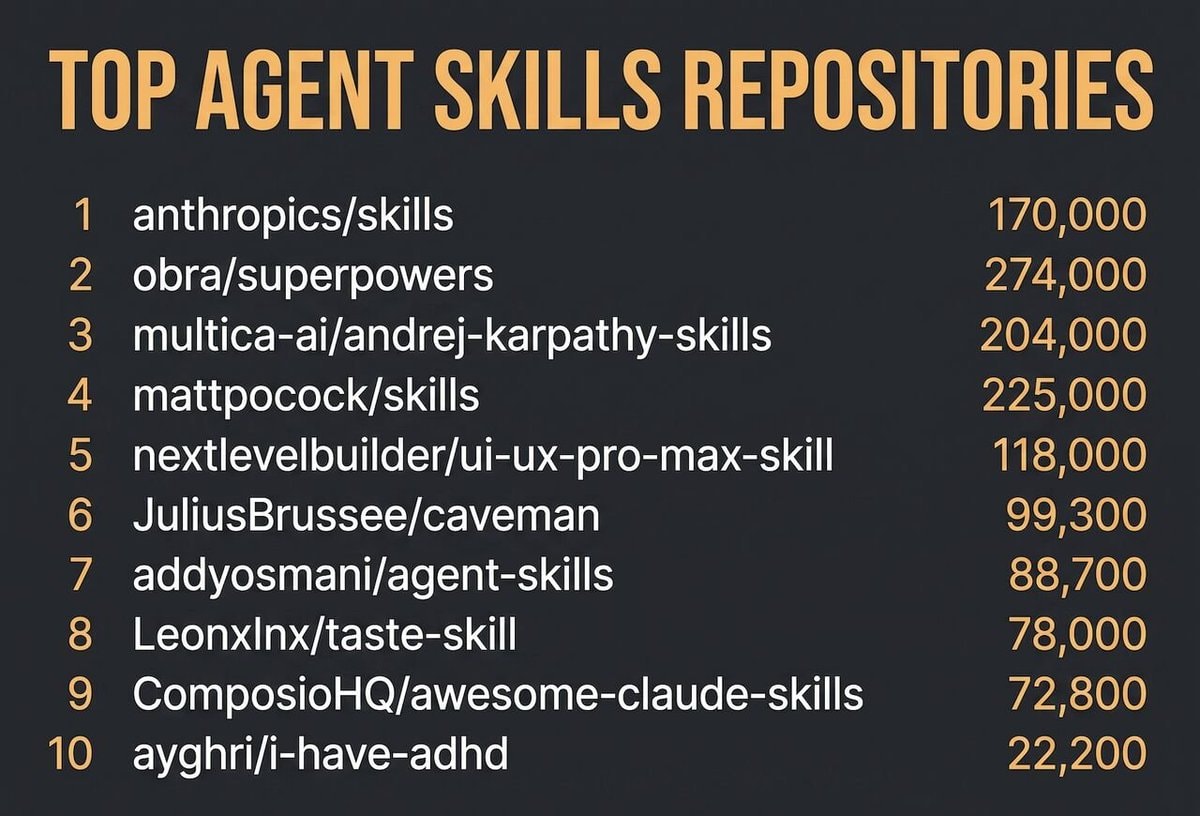
    GitHub streak patternGitHub streak patternMarvel Spider-Man SpidyVR modMarvel Spider-Man SpidyVR modFriday deployment ruleFriday deployment ruleLearn Harness Engineering GitHub CourseLearn Harness Engineering GitHub CourseKimi K3 runs on 8GB RAMKimi K3 runs on 8GB RAMLinus Torvalds GitHub profileLinus Torvalds GitHub profileTop Agent Skills Repositories GitHub 2026Top Agent Skills Repositories GitHub 2026SuperGrok Heavy pricing and featuresSuperGrok Heavy pricing and featuresDeepSeek Harness 10k stars recordDeepSeek Harness 10k stars recordCOLIBRI GLM-5.2 744B modelCOLIBRI GLM-5.2 744B modelanydoc Rust libraryanydoc Rust libraryInvidious open source YouTube front-endInvidious open source YouTube front-endAgent Flow GitHub visualizationAgent Flow GitHub visualizationmeshLLM GitHub projectmeshLLM GitHub projectJolli Memory AI open-source layerJolli Memory AI open-source layerColibrì GLM-5.2 25GB RAMColibrì GLM-5.2 25GB RAM
    Photo
    Ts Floyd
    Ts Floyd@ts_floyd1h
    📱GitHub💭AI💭Tech
    opus-5.5 reverse-engineering tool

    @ts_floydA new workflow combining Claude Opus 5.5 with Reverse Engineering MCP has reportedly impacted over 100 software companies by enabling an agent to analyze applications without ever touching their source code. The method follows a strict sequence: ask questions like how does search work in the Notes app, inspect binaries or sites locally, trace features from entry to result, prove claims via observation tags, and rebuild the application. One specific instance involved a function rebuilt in C that passed 3,205 test cases while matching all 63 compiled bytes of the original. Getting started requires a single line command, npx rea-agents setup, followed by sending the GitHub repository and the Claude Opus 5.5 setup directly to the agent. Users can then reference an article containing best practices for the Opus 5.5 prompt to refine their approach. #GitHub

    View original post
    opus-5.5 reverse-engineering tool

    Photo by @ts_floyd· Oct 12, 2026· GitHub

    About this photo

    The image is a screenshot of a web page detailing a reverse engineering prompt. The focus is on the text and layout of the prompt itself, presented in a clean, technical, and instructional style. The mood is informative and methodical. A notable visual element is the pixelated robot icon on the left and the stylized asterisk logo on the right. The page title reads "opus-5.5 / reverse-engineering".

    See all GitHub photosRead the GitHub wiki

    ?

    More GitHub photos

    See all GitHub photos
    GitHub streak patternGitHub streak patternMarvel Spider-Man SpidyVR modMarvel Spider-Man SpidyVR modFriday deployment ruleFriday deployment ruleLearn Harness Engineering GitHub CourseLearn Harness Engineering GitHub CourseKimi K3 runs on 8GB RAMKimi K3 runs on 8GB RAMLinus Torvalds GitHub profileLinus Torvalds GitHub profileTop Agent Skills Repositories GitHub 2026Top Agent Skills Repositories GitHub 2026SuperGrok Heavy pricing and featuresSuperGrok Heavy pricing and featuresDeepSeek Harness 10k stars recordDeepSeek Harness 10k stars recordCOLIBRI GLM-5.2 744B modelCOLIBRI GLM-5.2 744B modelanydoc Rust libraryanydoc Rust libraryInvidious open source YouTube front-endInvidious open source YouTube front-endAgent Flow GitHub visualizationAgent Flow GitHub visualizationmeshLLM GitHub projectmeshLLM GitHub projectJolli Memory AI open-source layerJolli Memory AI open-source layerColibrì GLM-5.2 25GB RAMColibrì GLM-5.2 25GB RAM