
iFANN
    Search iFANN...
    Log in
    Home
    News
    Videos
    Photos
    GIFs
    Explore
    Polls
    Awards
    iFAMOUS
    Wiki
    Anime
    Rooms
    Notifications
    Messages
    Bookmarks
    Profile
    WikiAwardsiFAMOUSRankingsIndustriesCreator RewardsUser RewardsTermsPrivacyCommunity GuidelinesTakedown / DMCAHelpDevelopers

    © 2026 iFANN

    Home
    Search
    Messages
    Alerts
    Profile
    Photo
    Timofey
    Timofey@timofey0mo
    💭Tech💭Productivity
    20 Microsoft Excel Keyboard Shortcuts

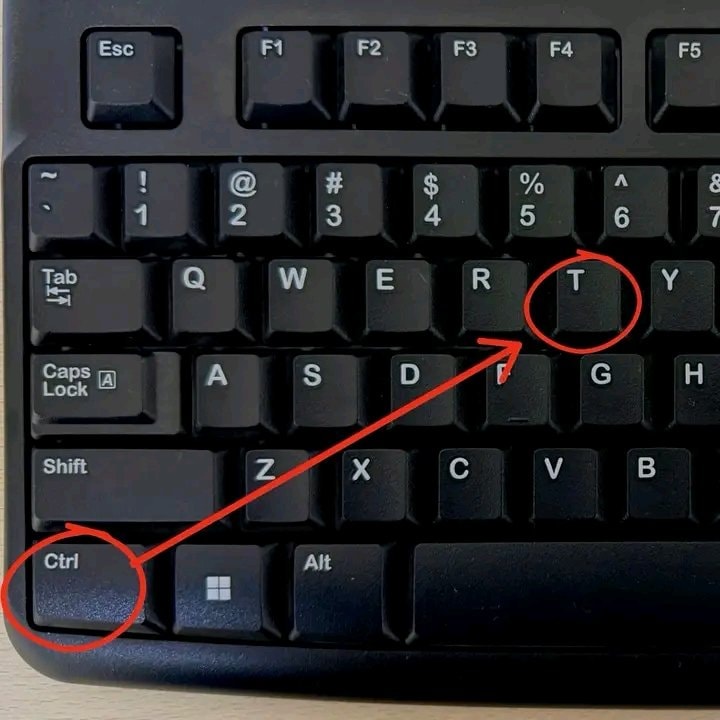
    @timofeyStop clicking around Excel! Here are 20 Microsoft Excel keyboard shortcuts to save time. Ctrl + C is for Copy and Ctrl + V is for Paste while Ctrl + X handles Cut. Hit Ctrl + Z for Undo or Ctrl + Y for Redo when needed. Save your work fast with Ctrl + S, Find anything with Ctrl + F, or use Ctrl + H for Find & Replace. Select All with Ctrl + A, jump through data using Ctrl + Arrow, and select data quickly with Ctrl + Shift + Arrow. Go to cell A1 via Ctrl + Home or reach the last used cell with Ctrl + End. Edit a cell with F2, AutoSum with Alt + =, and open Format Cells with Ctrl + 1. Insert today's date using Ctrl + ; and current time with Ctrl + Shift + :. Turn filters on or off with Ctrl + Shift + L. The image highlights creating a table with Ctrl + T. Save this post so you can come back to it later! Which Excel shortcut do you use the most? #Tech

    View original post

    20 Microsoft Excel Keyboard Shortcuts

    Photo by @timofey· Aug 21, 2026· Tech

    About this photo

    The focus is a computer keyboard. Red circles highlight the "Ctrl" and "T" keys, with a red arrow connecting them. The image is a close-up, top-down shot of the keyboard's keys. The mood is instructional or informative, likely demonstrating a keyboard shortcut. The keys are standard QWERTY layout.

    See all Tech photos

    ?

    No comments yet. Be the first!

    More Tech photos

    See all Tech photos
    Travis Scott RHYNO Spotify debut2Travis Scott RHYNO Spotify debut20 JEV Tips for Machine Decision Models20 JEV Tips for Machine Decision ModelsElon Musk Uranus joke theoryElon Musk Uranus joke theorythv collagethv collageNick Bostrom on machine intelligenceNick Bostrom on machine intelligenceElon Musk X usage recordsElon Musk X usage recordsAudio app beats ChatGPT to #2Audio app beats ChatGPT to #2Apple executive on iPhone durabilityApple executive on iPhone durabilitySecret internet life and Pocket FM milestoneSecret internet life and Pocket FM milestoneGoogle Gemini security breach alertGoogle Gemini security breach alertPS4 console updatePS4 console updateGoogle Astra policy reactionGoogle Astra policy reactionAnthropic Claude AI development2Anthropic Claude AI developmentSpotify Fresh Finds Forward independent artistsSpotify Fresh Finds Forward independent artistsApple TV app iconApple TV app iconFigure Helix 2.5 robot testingFigure Helix 2.5 robot testingOpenAI hack tied to Anthropic models2OpenAI hack tied to Anthropic modelsPC graphics settings guidePC graphics settings guide
    Photo
    Timofey
    Timofey@timofey0mo
    💭Tech💭Productivity
    20 Microsoft Excel Keyboard Shortcuts

    @timofeyStop clicking around Excel! Here are 20 Microsoft Excel keyboard shortcuts to save time. Ctrl + C is for Copy and Ctrl + V is for Paste while Ctrl + X handles Cut. Hit Ctrl + Z for Undo or Ctrl + Y for Redo when needed. Save your work fast with Ctrl + S, Find anything with Ctrl + F, or use Ctrl + H for Find & Replace. Select All with Ctrl + A, jump through data using Ctrl + Arrow, and select data quickly with Ctrl + Shift + Arrow. Go to cell A1 via Ctrl + Home or reach the last used cell with Ctrl + End. Edit a cell with F2, AutoSum with Alt + =, and open Format Cells with Ctrl + 1. Insert today's date using Ctrl + ; and current time with Ctrl + Shift + :. Turn filters on or off with Ctrl + Shift + L. The image highlights creating a table with Ctrl + T. Save this post so you can come back to it later! Which Excel shortcut do you use the most? #Tech

    View original post
    20 Microsoft Excel Keyboard Shortcuts

    Photo by @timofey· Aug 21, 2026· Tech

    About this photo

    The focus is a computer keyboard. Red circles highlight the "Ctrl" and "T" keys, with a red arrow connecting them. The image is a close-up, top-down shot of the keyboard's keys. The mood is instructional or informative, likely demonstrating a keyboard shortcut. The keys are standard QWERTY layout.

    See all Tech photos

    ?

    No comments yet. Be the first!

    More Tech photos

    See all Tech photos
    Travis Scott RHYNO Spotify debut2Travis Scott RHYNO Spotify debut20 JEV Tips for Machine Decision Models20 JEV Tips for Machine Decision ModelsElon Musk Uranus joke theoryElon Musk Uranus joke theorythv collagethv collageNick Bostrom on machine intelligenceNick Bostrom on machine intelligenceElon Musk X usage recordsElon Musk X usage recordsAudio app beats ChatGPT to #2Audio app beats ChatGPT to #2Apple executive on iPhone durabilityApple executive on iPhone durabilitySecret internet life and Pocket FM milestoneSecret internet life and Pocket FM milestoneGoogle Gemini security breach alertGoogle Gemini security breach alertPS4 console updatePS4 console updateGoogle Astra policy reactionGoogle Astra policy reactionAnthropic Claude AI development2Anthropic Claude AI developmentSpotify Fresh Finds Forward independent artistsSpotify Fresh Finds Forward independent artistsApple TV app iconApple TV app iconFigure Helix 2.5 robot testingFigure Helix 2.5 robot testingOpenAI hack tied to Anthropic models2OpenAI hack tied to Anthropic modelsPC graphics settings guidePC graphics settings guide